What is “Skip the Month” and how do I skip?
Last updated:
Each month between the 1st and the 5th, you have the opportunity to explore our new collections and bundles. To avoid being charged the monthly membership fee and receiving a promotional VIP Credit, you can choose to skip the month.
Important: Skipping the month does not cancel your membership. Your VIP membership remains active for that month, which means you can still shop at VIP member prices and redeem any eligible unused VIP Credits already on your account while your membership remains active.
Because you can only skip one month at a time, you must be logged into your account to see and use the “Skip the Month” button. If you cannot find the button, please double-check that you are signed in.
Here is how to skip based on the platform you are using (available only between the 1st and 5th of each month):
On the Website (Desktop & Mobile Browser):
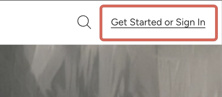
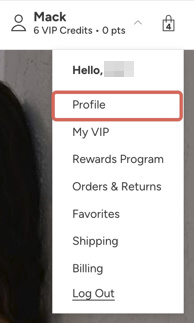
- Click and go to your Account Profile page. (Note: If you are not logged in yet, this link will automatically direct you to the login page first).
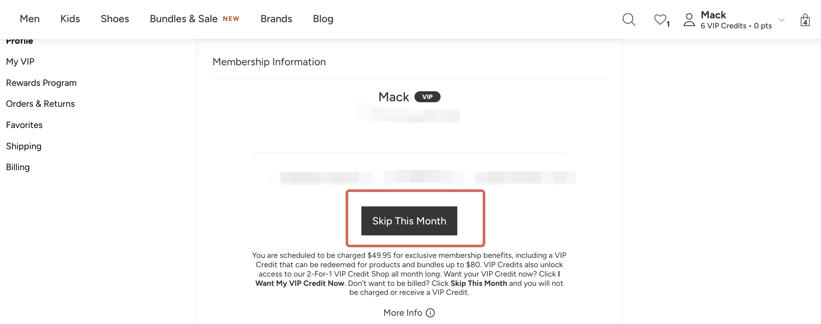
- Once logged in, you will see the “Skip the Month” button on this page. Follow the prompts to successfully skip.
Note: On the website, after selecting “Skip the Month,” you may see additional on-screen steps before the process is complete. Follow the prompts shown to finish.
In the App:
- Log into your account in the app.
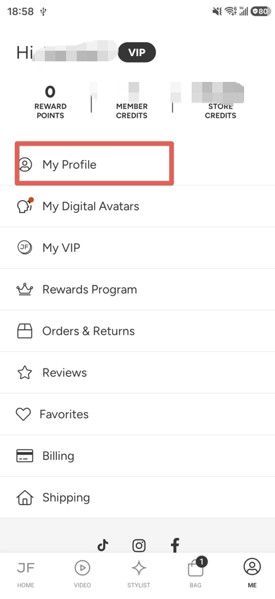
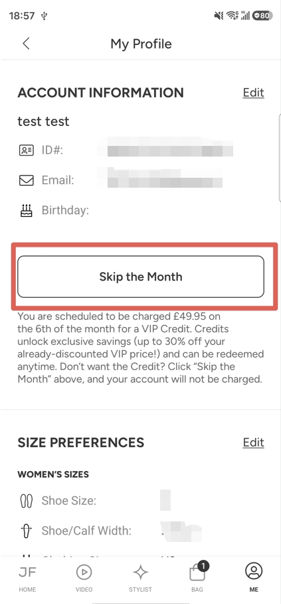
- Tap “ME” in the bottom navigation menu.
- Tap “My Profile” at the top of the screen.
- You will see the “Skip the Month” button. Follow the prompts to successfully skip.
If you need help, you can also contact our customer service team via Chat or Phone.
Missed the skip window?
If you missed the 1st–5th skip window and would like to request a refund for unused and unexpired VIP Credits on your account, or if you would like to cancel your membership to stop future charges, please contact our customer service team via Chat or Phone. We are always here to help and will do our best to assist you.
Was this article helpful?